
NIWC 2026: AI & the Future of Everything
Listen to the
AI KEYNOTE SONG
The easiest way to review or share the key points of my AI Keynote is with this song: the full keynote, matched with slides, in 4m32s!
A day in the life in YOUR AI FUTURE

PDF SUMMARY of key slides
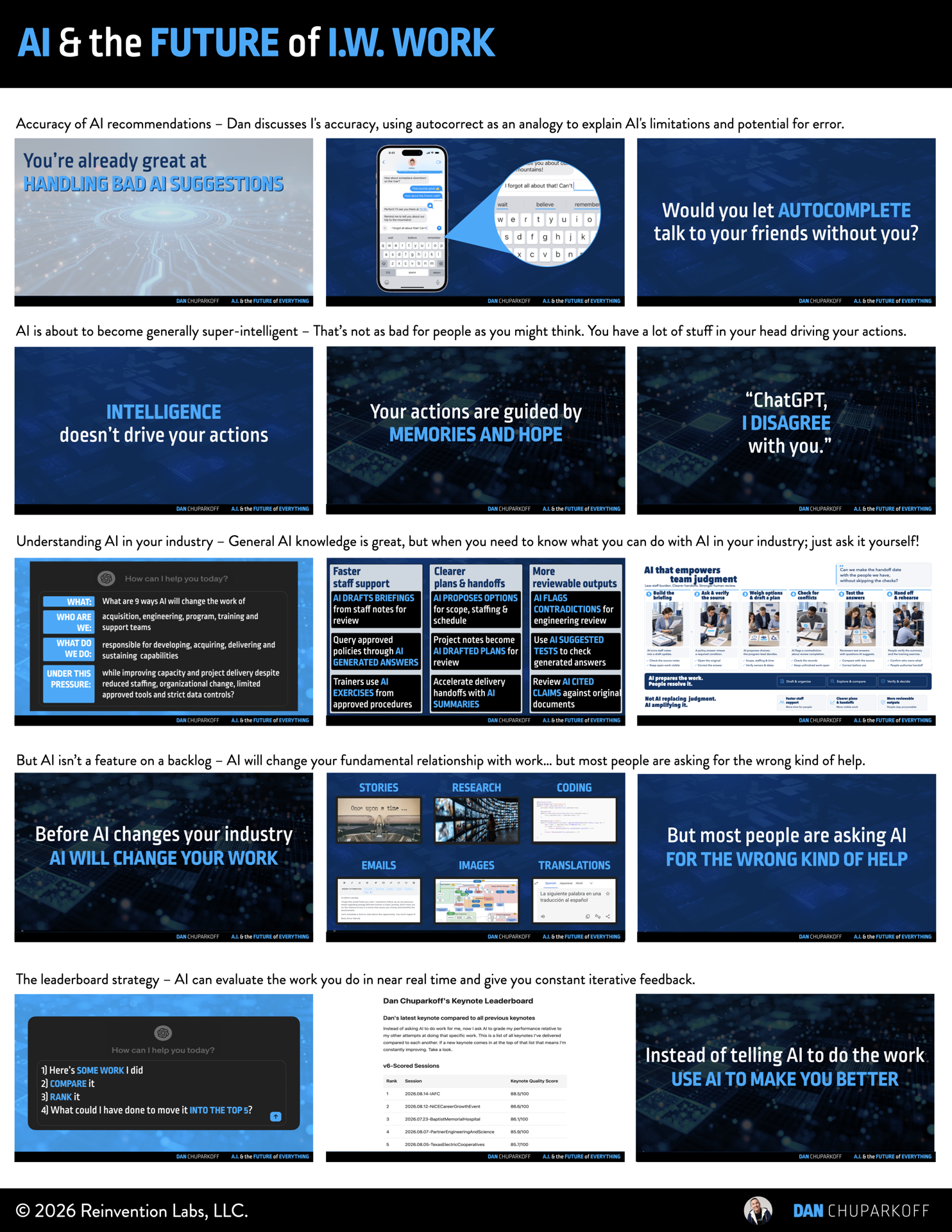
This “Slide Cheatsheet” was customized for your specific talk. It’s designed to help audience-members like you, by wrapping my AI & the Future of Everything keynote into an easy-to-skim, easy-to-share, or easy-to-print resource for future reference.
Download the 3 page
high-resolution PDF here:
Hope you find it helpful!
AI NOTES from Dan’s AI Keynote
*These notes were created using ChatGPT 6 pro.
Transcription errors or mistakes have not been fixed
in order to demonstrate the current state of AI notes.
One-Sentence Takeaway
Use AI to reduce the communication, processing, and investigation work that fills your week so you have more time to solve problems, make decisions, and imagine better ways to deliver on your team’s mission.
Summary
Teams are trying to improve capacity and project delivery while managing reduced staffing, organizational change, limited approved tools, and strict data controls. Dan framed AI as another step in a long history of technology assistance. His early experience watching AutoCAD turn days of manual parking-lot drafting into seconds of copy and paste illustrated the distinction: a tool can dramatically change the work while a person continues to direct it.
AI's useful answers still need human judgment. The keynote's next-word exercise, glue-in-pizza example, and comparison with phone autocomplete showed why a plausible suggestion needs to be evaluated in context. You bring experience, goals, memories, and hopes that shape what a good answer means. Keep developing your specialty while using AI to improve the other work competing for your attention.
The practical opportunity is to improve both the work and the person doing it. Ask AI to compare your work with your own previous examples using criteria you define. Explore assistance for briefings, plans, handoffs, and review. Build in monitoring and human intervention as AI becomes part of a workflow. The work pyramid gives these changes a purpose: spend less time consumed by its bottom layers and more time solving, deciding, and imagining.
Action Items
[ ] Identify one recurring communication, processing, or investigation task that crowds out your expert work. Choose an AI-assisted approach within your approved tools and data-use rules.
[ ] Ask an approved AI assistant how your team's work could change. Include your roles, mission, capacity goals, and constraints; ask for possible next steps and guardrails.
[ ] Use AI as a performance coach: compare a recent brief, plan, or other permitted work sample with your previous examples using your own criteria. Ask what would make this your best work, then revise it yourself.
[ ] Decide how you will review AI-assisted work before relying on it. Check claims against their sources, test answers, and identify where a person must monitor, intervene, or take over.
[ ] Choose a problem, decision, or future improvement that needs more of your attention. Direct the time recovered from routine work toward that higher part of the pyramid.
Key Ideas
Assistant versus automator
Faster execution does not remove the need for someone to direct the work. The AutoCAD story made this distinction concrete.
Probability versus judgment
A likely next word is not automatically the answer you need. Evaluate whether an output is good enough for the particular decision and its consequences.
Your context advantage
Past experiences, present priorities, and hopes for the future shape your choices. AI suggestions can help, while you retain responsibility for deciding what fits.
Expertise plus broader assistance
Keep strengthening the work you aim to do exceptionally well. Use AI to improve supporting activities such as communication, research, and planning.
AI as a performance coach
Ask how to do the work better. Comparisons with your own examples and criteria can turn an AI interaction into feedback that develops your skills.
Reliability requires oversight
Using AI is easier than operating it reliably. Monitoring should reveal anomalies and errors so people can respond and take manual control when needed.
The six layers of work
Communicate, process, investigate, solve, decide, and imagine. The keynote's goal was to compress the lower layers and make room for more of the work at the top.
AI Opportunities for Your Team
The keynote presented three groups of opportunities for acquisition, engineering, program, training, and support teams. These are starting points for exploring work with approved tools and permitted information; people review the outputs and retain decisions.
Faster staff support
AI DRAFTS BRIEFINGS from staff notes for review
Query approved policies through AI GENERATED ANSWERS
Trainers use AI DRAFTED EXERCISES from approved procedures
Clearer plans & handoffs
AI PROPOSES OPTIONS for scope, staffing & schedule
Project notes become AI DRAFTED PLANS for review
Prepare delivery handoffs with AI GENERATED SUMMARIES
More reviewable outputs
AI FLAGS CONTRADICTIONS across drafts for engineering review
Reviewers use AI SUGGESTED TESTS to check generated answers
Review AI CITED CLAIMS against original documents
What are 9 ways AI will change the work of acquisition, engineering, program, training and support teams responsible for developing, acquiring, delivering and sustaining NIWC capabilities while improving capacity and project delivery despite reduced staffing, organizational change, limited approved tools and strict data controls?
Use the answers to start a conversation about your work. Explore the options, ask follow-up questions, and decide which are useful in your setting.
Talk Flow
1. See AI through the history of technology assistance
Rising demands & constrained capacity
More work, fewer resources, and fixed hours make assistance relevant to the way you deliver on your mission.
The AutoCAD copy/paste moment
A repetitive drafting task changed dramatically when the tool handled repetition and the architect directed it.
After seeing useful assistance, returning to the manual approach felt difficult to justify.
The staircase of technology & the AI pinata
PCs, spreadsheets, the internet, and other tools became part of ordinary work; AI is another assistance transition.
Explore what AI is good at and where its value exceeds the risk or cost of using it.
2. Understand why useful AI still needs your judgment
The next-word exercise & the B-minus student
“Once upon a time” illustrated prediction and common answers; common answers are not always expert answers.
Keep improving your specialty and use AI for other work that gets in its way.
Confidence depends on the decision
The best suggestion a model can produce may still fall short of the confidence your situation requires.
Glue in the pizza
Training material can mix expertise with sarcasm, jokes, and bad advice. Look for those problems in generated answers.
Autocomplete, memories & hopes
Accepting a useful word suggestion does not mean letting the phone conduct a conversation without you.
Your experiences and hopes influence decisions beyond what a likely answer can capture.
3. Apply AI to work & personal improvement
A question built around the team's work
Describe the roles, mission, desired results, and constraints when asking how AI could help.
Ask about next steps and guardrails as well as possible uses.
Three opportunity groups & a day in the life
Explore faster staff support, clearer plans and handoffs, and more reviewable outputs.
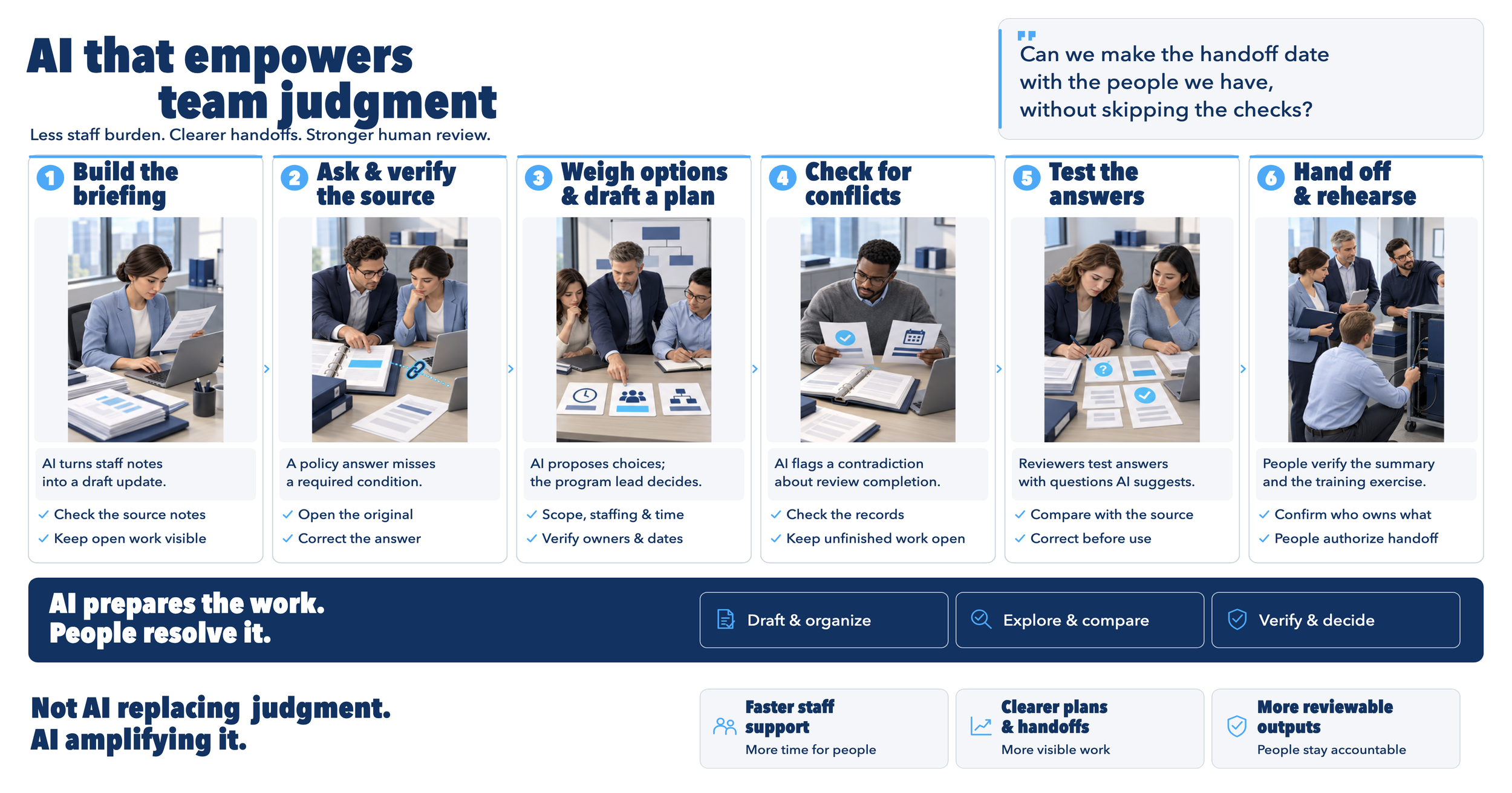
People question suggestions, verify sources, weigh options, check conflicts, test answers, and prepare handoffs.
The performance-coach shift
Dan's comparison of a new LinkedIn post with his previous posts turned a frustrating writing exercise into a useful critique.
Apply your own criteria, learn from your stronger examples, and use the feedback to improve how you do the work.
4. Move up the work pyramid & operate AI reliably
Work versus jobs
Removing some tasks can make room for important work that an overloaded team cannot currently reach.
Six kinds of work
Communication, processing, and investigation can consume the week; solving, deciding, and imagining need deliberate time.
Generating many ideas differs from choosing the direction you want your team to pursue.
Monitoring & human intervention
Familiar system-monitoring practices illustrate the need to detect anomalies in AI-assisted work.
People must be able to investigate errors, intervene, and take manual control when necessary.
5. Improve communication & use the recovered time well
Capture, summarize & retrieve
Meeting notes and summaries can preserve information, help absent colleagues, and make earlier discussions available when needed.
Turn an important message into a song
Dan used Suno to turn his keynote material into music and reinforce the solve, decide, and imagine refrain.
The application was a message worth repeating, rather than turning every meeting into a song.
Collaborate across languages
The translated-video demonstration and travel and construction-team stories illustrated people working in languages comfortable to them.
CLOSING MESSAGE: Turn the pyramid over
Flip the pyramid
Use assistance with the lower layers to make more time for difficult problems, informed decisions, and imagining better ways to work.
Put that time toward the future of I.W. and the people who depend on your team to keep us safe.