
Argonne STEM Summit 2026: AI & the Future of STEM Education
Listen to the
AI KEYNOTE SONG
The easiest way to review or share the key points of my AI Keynote is with this song: the full keynote, matched with slides, in 4m32s!
A day in the life in YOUR AI FUTURE

PDF SUMMARY of key slides
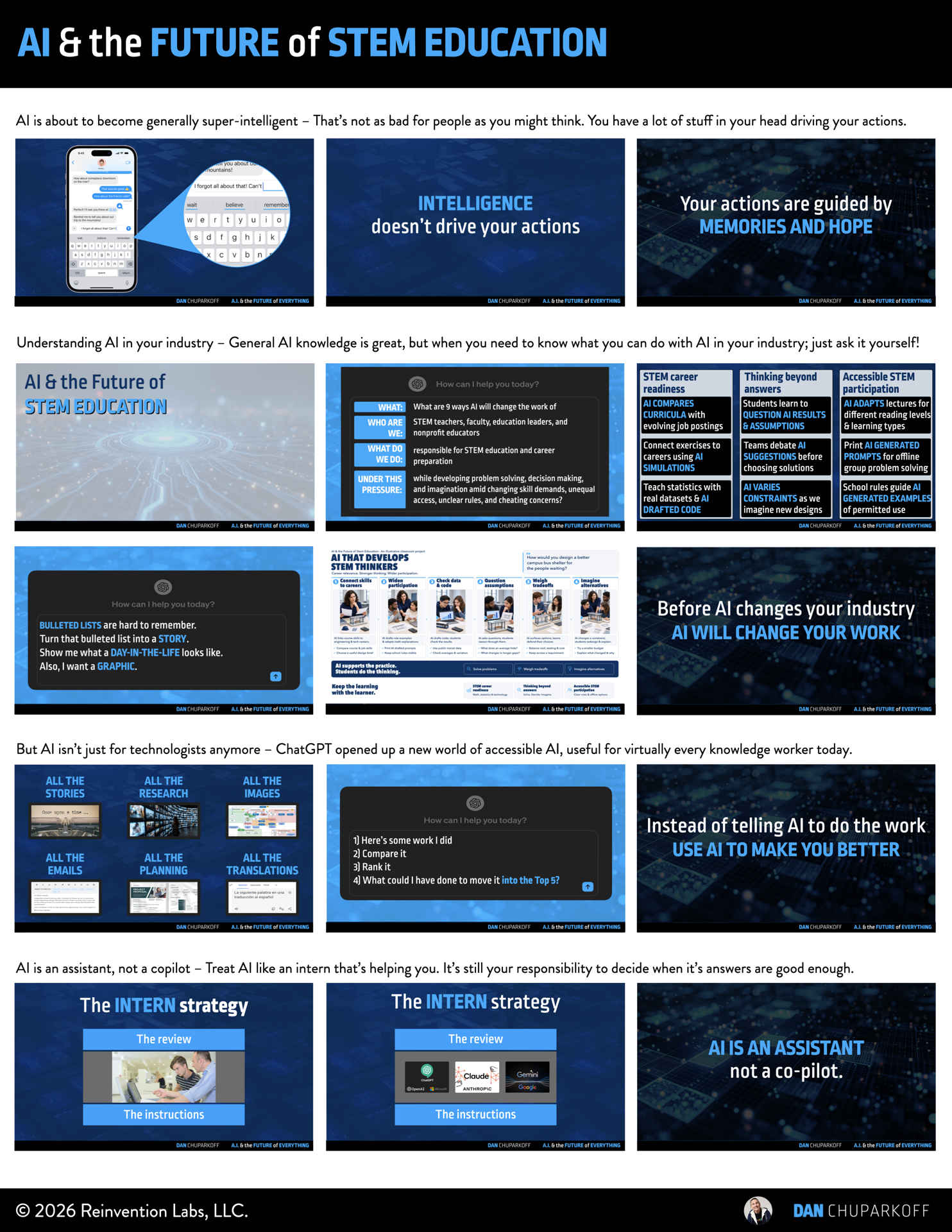
This “Slide Cheatsheet” was customized for your specific talk. It’s designed to help audience-members like you, by wrapping my AI & the Future of Everything keynote into an easy-to-skim, easy-to-share, or easy-to-print resource for future reference.
Download the 3 page
high-resolution PDF here:
Hope you find it helpful!
AI NOTES from Dan’s AI Keynote
*These notes were created using ChatGPT 5.6 pro.
Transcription errors or mistakes have not been fixed
in order to demonstrate the current state of AI notes.
One-Sentence Takeaway
Use AI to make working with information easier so educators and students can spend more time solving problems, making decisions, and imagining better futures.
Summary
Dan opened with an AI-generated introduction and a story about discovering AutoCAD as a teenager drawing parking lots. Copy and paste transformed a repetitive task, while architects still directed the work. The distinction between an assistant and an automator carries into STEM education: teachers and students need to understand what to hand to AI and what to direct themselves.
The next-word experiment, glue-in-the-pizza example, and autocomplete analogy explained why useful AI suggestions still require judgment. A probable answer can miss the context or repeat poor source material. Educators can use that limitation as a teaching opportunity: students should learn to question answers, investigate sources, and explain their choices. AI can broaden what people can attempt while they continue developing deep expertise.
For STEM education, the keynote highlighted career readiness, thinking beyond answers, and accessible participation. It then introduced AI as a coach: do the work, set your own criteria, and ask for feedback that helps you improve. The closing pyramid connected these ideas to daily life. Making communication, process, and investigation more efficient creates room for the human work of solving, deciding, and imagining.
Action Items
[ ] Customize the nine-ways question below for your role, students, and constraints. Ask follow-up questions about the opportunities and risks most relevant to your setting.
[ ] Give students an AI-written paper and ask them to identify ten things that are wrong with it. Have them examine sources and explain what they would change.
[ ] Choose a piece of your own work and define what makes it good. Ask AI to compare it with earlier attempts using those criteria, identify what your strongest examples do better, and use the feedback to revise it.
[ ] Ask AI to help compare current Illinois job postings with postings from six months earlier. Review the examples to identify changing skills and what they mean for students' preparation.
[ ] Map a typical week against the six kinds of work below. Choose one communication task for assistance through an institution-approved tool, and decide which problem, decision, or future idea deserves the time you recover.
Key Ideas
Assistance with human direction
The AutoCAD story separates help with a task from ownership of the profession. People still decide what to build, why it matters, and whether the result works.
Probability needs judgment
The most likely continuation is not necessarily the answer your situation needs. The pizza example makes source quality memorable; autocomplete shows the familiar habit of accepting, correcting, or rejecting a suggestion.
Broad assistance & deep expertise
Dan's B-minus/A-plus analogy describes using AI to improve work outside your specialty while choosing where to become an expert. Students still need a domain in which they can question and improve the answer.
Coaching that builds capability
Define the criteria yourself. Comparing successive attempts at the same work can turn AI feedback into a way to practice and improve, rather than simply obtain a finished draft.
Six kinds of work
The pyramid moves from communication, process, and investigation to problem solving, decision making, and imagining. Use assistance with the lower layers to make time for the upper layers. Memories, hopes, and knowledge of the situation shape the choices people make there.
Opportunities for STEM educators
Start the conversation with the question from the keynote, then adapt it to your setting:
What are 9 ways AI will change the work of STEM teachers, faculty, education leaders, and nonprofit educators responsible for STEM education and career preparation while developing problem solving, decision making, and imagination amid changing skill demands, unequal access, unclear rules, and cheating concerns?
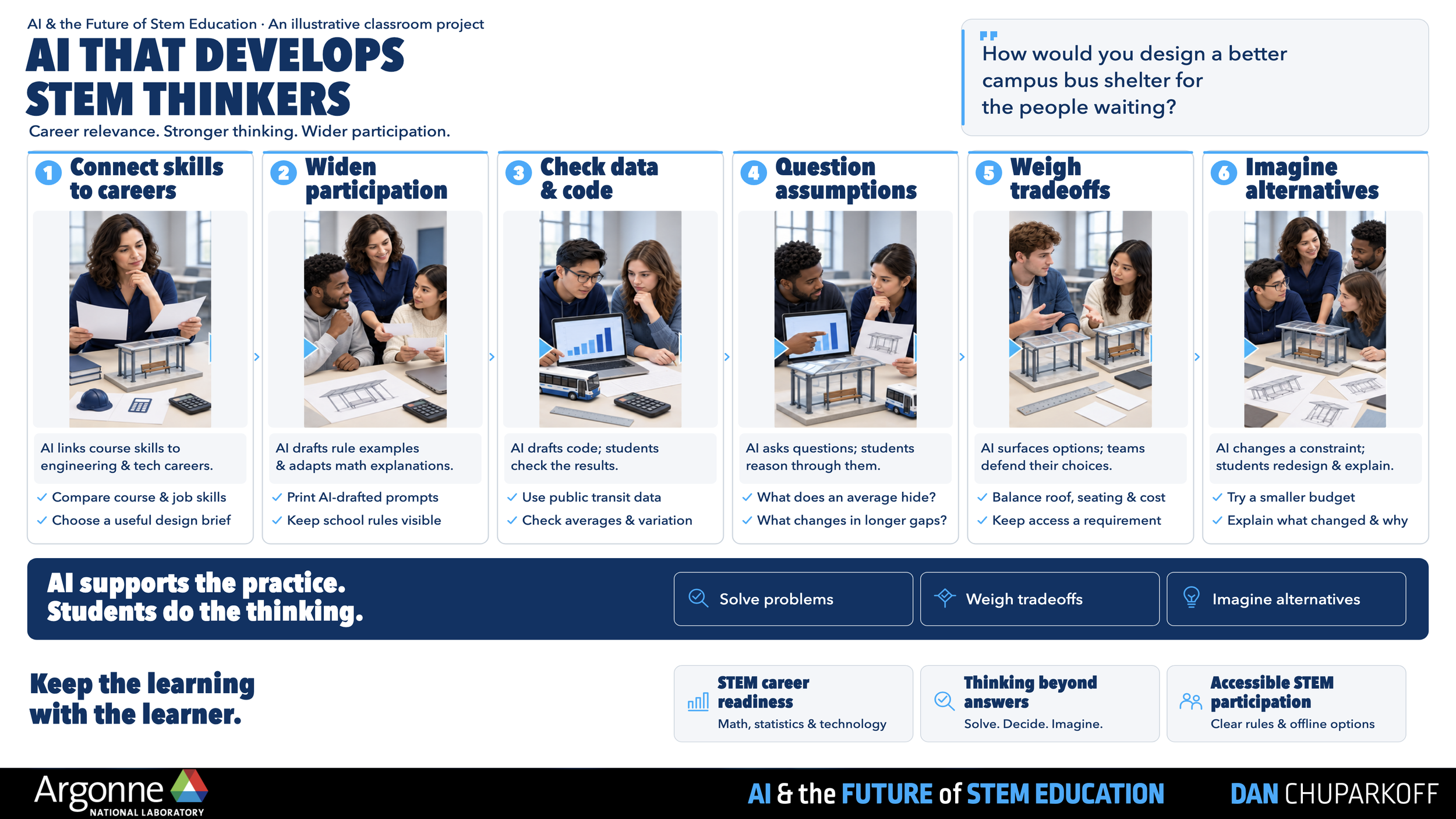
The audience slide grouped nine opportunities into the three areas below. Dan developed each group's central idea through examples; these are starting points to investigate, not a fixed answer for every institution.
STEM career readiness
AI COMPARES CURRICULA with evolving job postings
Connect exercises to careers using AI SIMULATIONS
Teach statistics with real datasets & AI DRAFTED CODE
Thinking beyond answers
Students learn to QUESTION AI RESULTS & ASSUMPTIONS
Teams debate AI SUGGESTIONS before choosing solutions
AI VARIES CONSTRAINTS as we imagine new designs
Accessible STEM participation
AI ADAPTS lectures for different reading levels & learning types
Print AI GENERATED PROMPTS for offline group problem solving
School rules guide AI GENERATED EXAMPLES of permitted use
The live examples were concrete: examine how Illinois hiring is changing, make critique of an AI-written paper the assignment, and tailor students' next challenges to what they are ready to learn. Dan also showed how a list of opportunities can become a day-in-the-life story and a picture that makes the possibilities easier to discuss.
Talk Flow
1. Recognize what technology assistance changes
AI-generated opening
Improving tools change what people can create and how educators prepare students for work.
AutoCAD & the parking lot
Copy and paste replaced repeated manual drawing while the architect continued directing the design.
Look for assistance that lets people work with more precision and create more value.
Assistant versus automator
A tool doing part of the work does not remove the need for people to guide it.
The staircase & the pinata
Generative AI joins a sequence of technologies that become part of everyday work.
Explore what is useful inside the tool and where the value exceeds the cost and risk.
2. Understand suggestions & exercise judgment
GPTs & the next-word experiment
Generating a likely continuation differs from finding an existing answer through search.
B-minus breadth & A-plus expertise
Use assistance to expand your abilities while continuing to develop expertise that lets you judge the result.
Uncertainty & glue in the pizza
A leading answer can still have limited confidence or come from an unreliable source.
Teach students to examine what they can trust and where they need to investigate further.
Autocomplete as a familiar model
You already know how to use a suggestion without letting it speak for you unchecked.
Memories & hope
Your experiences and desired future influence decisions in ways the prompt may not capture.
Collaboration brings different experiences and goals into the decision.
3. Explore changes in STEM teaching
The nine-ways question
Name the roles, responsibilities, desired outcomes, and constraints before asking how the work could change.
Career readiness
Compare changing demand for skills with what students are learning and practicing.
Thinking beyond answers
Critiquing an AI-written paper develops the ability to question information and investigate its sources.
Accessible participation
Adapt the next challenge to the learner's readiness while considering access and rules.
A future day in pictures
Turn an abstract list into a story or image to make possible changes easier to understand.
4. Build capability & make room for human work
AI as a performance coach
Supply your own work and criteria, compare it with earlier attempts, and ask what would improve it.
Use feedback to strengthen your skill and retain your voice.
Work versus jobs
Separate the tasks a tool can help with from the broader responsibility a person carries.
The six-layer pyramid
Communication, process, and investigation consume time needed for solving, deciding, and imagining.
Choosing a direction and rallying people around it requires more than generating a list of ideas.
Curriculum for human capabilities
Give students practice solving unfamiliar problems, making choices, and imagining futures they want to create.
5. Improve communication & reclaim time
Notes & information sharing
Approved AI notetakers can fill gaps in personal notes and help people recover information from conversations.
Use tools that fit your institution's recording and privacy requirements.
A song as another format
The chorus reinforced the central lesson: people will always need to solve, decide, and imagine.
A new format can make an idea easier to remember and share.
Translation & collaboration
The translated-video demonstration illustrated how people can collaborate in languages more comfortable for them.
CLOSING MESSAGE: Expand collaboration & turn the pyramid over
Demands and information keep growing while the hours in a week stay fixed. Direct the time saved toward solving hard problems, making better decisions, and imagining the future of STEM education.